Back to blog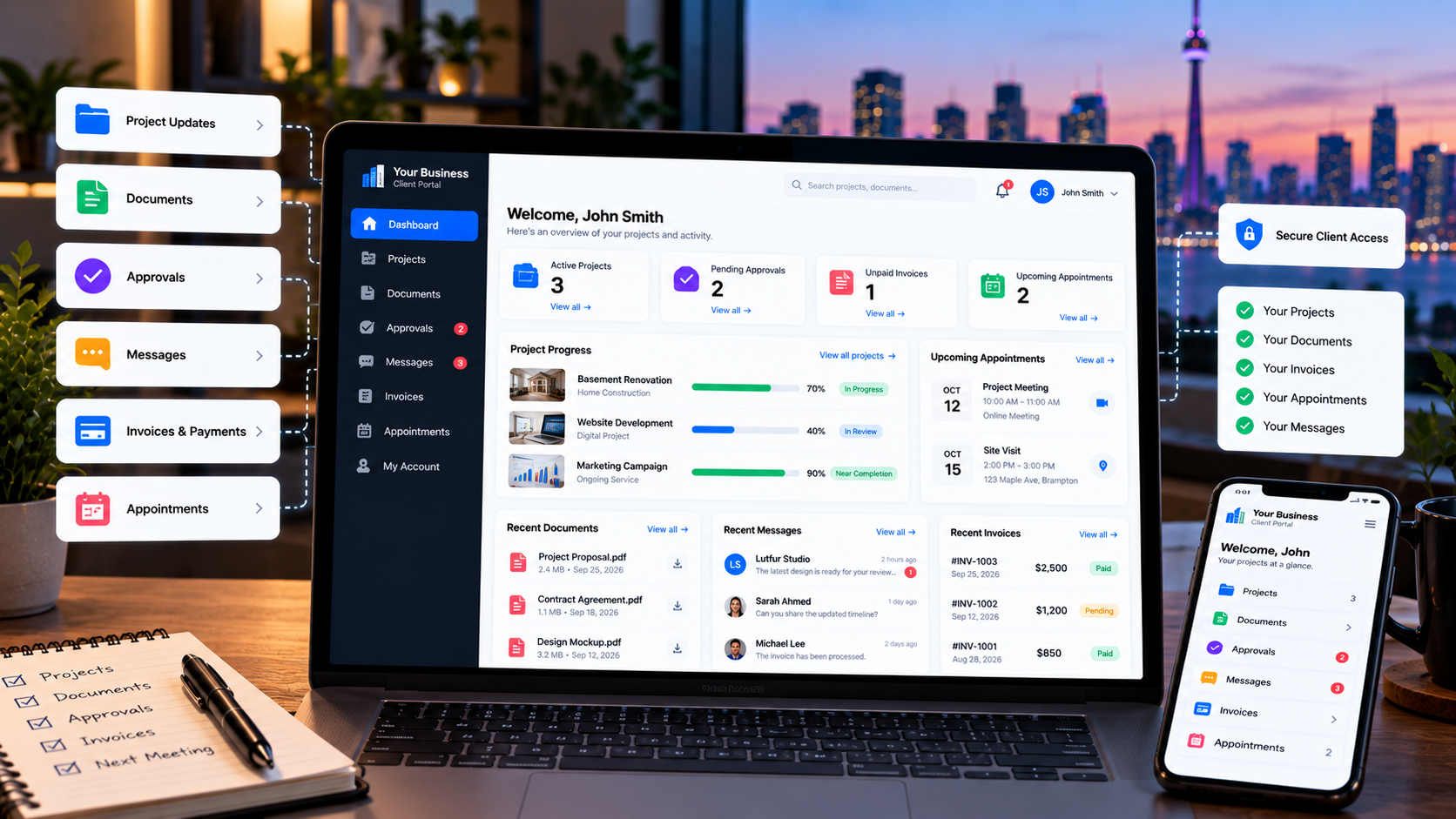
Business Systems9/28/2026
Custom Client Portals: When Does Your Business Need One?
A custom client portal can give customers one secure place to view project updates, documents, invoices, messages, and requests. Learn when a business actually needs one.
Custom Client Portals: When Does Your Business Need One?
Many businesses manage client communication through a combination of email, phone calls, shared files, spreadsheets, and separate software.
That can work when the business is small.
But as the number of clients and projects grows, customers may start asking the same questions repeatedly:
What is the status of my project?
Can you send me that document again?
Did you receive my files?
Has my invoice been paid?
Can I approve this?
A client portal can give customers one secure place to access the information and actions that are relevant to them.
But that does not mean every business needs a custom portal.
The important question is:
When does a client portal actually make sense for a business?
What Is a Client Portal?
A client portal is a secure, usually login-based area where customers can access information and interact with a business.
Depending on the business, a portal may allow clients to:
- View project status
- Review documents
- Upload files
- Send messages
- Submit requests
- Approve work
- View invoices
- Make payments
- View appointments
- Track orders or jobs
- Update account information
- Review documents
- Upload files
- Send messages
- Submit requests
- Approve work
- View invoices
- Make payments
- View appointments
- Track orders or jobs
- Update account information
The client sees their own information, while the business controls what each user can access.
A portal can therefore become a customer-facing layer connected to the systems the business already uses.
A Client Portal Is More Than a Login Page
A common misconception is that a client portal simply means giving customers a username and password.
The login is only the entry point.
The useful part is what happens after the client signs in.
For example:
Client Login → Project → Documents → Approval → Invoice → Payment
Or:
Customer Login → Booking → Appointment → Service Updates → Invoice
A good portal should be designed around the actual workflow between the business and its customers.
1. Clients Frequently Ask for Project Updates
One of the clearest signs that a portal may be useful is repeated status questions.
If clients regularly contact your team asking:
- What stage is my project at?
- What happens next?
- When will the next step be completed?
- Has my request been processed?
- What happens next?
- When will the next step be completed?
- Has my request been processed?
a portal can provide a central place for status information.
For example:
Project Status: In Progress
Current Stage: Materials Ordered
Next Step: Installation
Expected Date: October 15
The exact information depends on the business.
The important idea is that the customer can see relevant information without needing a separate status email every time.
2. Your Team Repeatedly Sends the Same Documents
Documents are another common reason businesses consider client portals.
A customer may need access to:
- Contracts
- Estimates
- Quotes
- Reports
- Invoices
- Receipts
- Project documents
- Photos
- Deliverables
- Certificates
- Estimates
- Quotes
- Reports
- Invoices
- Receipts
- Project documents
- Photos
- Deliverables
- Certificates
If employees repeatedly search through email threads and resend attachments, a centralized document area can make the process more organized.
A portal can also control which documents each client can access.
3. Approvals Are Happening Through Email or Text
Some businesses need clients to approve work before moving to the next stage.
Examples include:
- Quotes
- Designs
- Proposals
- Project milestones
- Change requests
- Documents
- Designs
- Proposals
- Project milestones
- Change requests
- Documents
Email approval can work, but it can become difficult to track as the number of projects grows.
A portal can provide a structured approval workflow.
For example:
Document Uploaded → Client Notified → Client Reviews → Approve / Request Changes → Approval Recorded
The system can then store the relevant status with the project.
This creates a clearer workflow than relying on scattered messages.
4. Clients Need to Submit Requests
A portal can also provide structured forms for client requests.
Instead of receiving:
> "Can you update this?"
through an email with limited context, a client could submit a structured request containing:
- Request type
- Description
- Priority
- Related project
- Attachments
- Desired date
- Description
- Priority
- Related project
- Attachments
- Desired date
The request can then enter the business's internal workflow.
This can be particularly useful for agencies, service companies, contractors, consultants, and businesses managing ongoing client relationships.
5. Clients Need to See Invoices and Payments
A client portal can also connect customer information with billing.
Depending on the system, clients may be able to:
- View invoices
- See payment history
- Check outstanding balances
- Download receipts
- Pay invoices
- See payment history
- Check outstanding balances
- Download receipts
- Pay invoices
For example:
Invoice #1042 — $1,250
Status: Paid
Payment Date: September 25, 2026
Instead of searching through old emails, the customer can access the information from their account.
6. Your Business Manages Long-Term Client Relationships
A portal can be particularly useful when a customer relationship continues over months or years.
For example:
- Marketing agencies
- Construction companies
- Consultants
- Professional services
- Maintenance companies
- Property-related services
- IT service providers
- Construction companies
- Consultants
- Professional services
- Maintenance companies
- Property-related services
- IT service providers
The client may have multiple projects, documents, invoices, requests, and conversations over time.
A portal can organize those interactions around the customer.
7. You Have Multiple Clients With Similar Workflows
A portal becomes more valuable when many customers go through a similar process.
For example:
New Client → Onboarding → Documents → Project → Review → Approval → Invoice → Payment
If every client follows roughly the same workflow, the portal can provide a repeatable experience.
The business can manage the workflow internally while each customer sees only the information relevant to their account.
8. You Need Different Access for Different Users
Security and permissions are important in a client portal.
A customer should generally only see information they are authorized to access.
For example:
Client A → Client A's projects and documents
Client B → Client B's projects and documents
A portal may also need different roles.
For example:
- Business administrator
- Internal staff
- Client administrator
- Client user
- Internal staff
- Client administrator
- Client user
Each role can have different permissions.
This is especially important when a client has multiple employees who need access to the same account.
9. You Want Your Client Experience to Match Your Brand
A third-party software platform may provide useful functionality, but the customer experience may be limited by the platform's interface and branding options.
A custom portal can potentially use:
- Your logo
- Your colours
- Your domain or subdomain
- Your terminology
- Your workflow
- Your customer communication style
- Your colours
- Your domain or subdomain
- Your terminology
- Your workflow
- Your customer communication style
For example:
portal.yourbusiness.com
can provide a more consistent experience than sending customers to several unrelated platforms.
However, branding alone is usually not a sufficient reason to build custom software.
The portal should solve a real business problem.
10. Your Business Uses Several Disconnected Systems
This is one of the strongest reasons to consider a custom portal.
Imagine a business using:
CRM → Project Management → Accounting → Calendar → Email
The customer may receive information from all of these systems separately.
A custom portal can potentially create one customer-facing experience while connecting the underlying systems.
For example:
Lead → Customer → Project → Task → Appointment → Invoice → Payment
The customer does not need to understand which internal software the business uses.
They simply see the information that matters to them.
11. Your Team Is Spending Too Much Time Answering Status Questions
A portal can be useful when repetitive customer questions consume significant staff time.
Examples:
- "Where is my project?"
- "Can you send the invoice?"
- "What did I approve?"
- "When is my appointment?"
- "Did you receive my document?"
- "What happens next?"
- "Can you send the invoice?"
- "What did I approve?"
- "When is my appointment?"
- "Did you receive my document?"
- "What happens next?"
If the information is already stored digitally, a portal may allow customers to access some of it themselves.
This does not eliminate human communication.
Instead, it can allow the team to spend more time on questions that actually require human attention.
What Features Can a Client Portal Include?
The right features depend on the business.
Common portal features include:
Secure Client Login
Customers sign in to access their account.
Client Dashboard
A summary of relevant projects, appointments, invoices, messages, or tasks.
Project Tracking
Customers can view project stages, milestones, deadlines, or progress.
Document Management
Clients can upload and download documents and files.
Approval Workflows
Customers can approve quotes, documents, designs, or milestones.
Messaging
A structured communication area can keep conversations connected to the relevant project or request.
Invoices and Payments
Customers can view invoices, balances, payment history, and supported payment options.
Appointment Information
Customers can view upcoming appointments or access supported booking functions.
Request Forms
Customers can submit structured service or support requests.
Notifications
The portal can notify customers about important changes, documents, messages, or actions that require attention.
Admin Dashboard
Internal staff need their own interface to manage clients, permissions, projects, documents, requests, and other portal information.
Client Portal vs Customer Portal
You may see the terms client portal and customer portal used interchangeably.
The terminology often depends on the type of business.
A professional services firm may call it a client portal.
An e-commerce or service company may call it a customer portal.
The underlying idea is similar:
Give each customer a secure place to access information and interact with the business.
Do You Need a Custom Portal?
Not necessarily.
This is an important part of the decision.
You may not need custom development if:
- Your existing software already has a suitable portal
- Your workflow is straightforward
- Your clients only need basic information
- Your integrations are already available
- Your current process does not create significant manual work
- Your workflow is straightforward
- Your clients only need basic information
- Your integrations are already available
- Your current process does not create significant manual work
An existing platform may be the simpler solution.
Custom development becomes more relevant when the business workflow does not fit comfortably into existing software.
For example, you may need a portal that connects:
Customers + Projects + Documents + Approvals + Appointments + Invoices + Payments
and you need those components to work together according to your specific rules.
In that situation, a custom business system may be worth evaluating.
Custom Portal vs Existing Software
There are two common approaches.
Existing Client Portal Software
This approach can provide:
- Faster setup
- Existing features
- Managed infrastructure
- Standard integrations
- Lower initial development requirements
- Existing features
- Managed infrastructure
- Standard integrations
- Lower initial development requirements
The trade-off is that you generally work within the platform's available functionality and customization options.
Custom Client Portal
A custom portal can be designed around your specific workflow.
Possible advantages include:
- Custom user experience
- Custom permissions
- Business-specific workflows
- Custom integrations
- Connection to internal systems
- Custom reporting
- Your own branding
- Custom permissions
- Business-specific workflows
- Custom integrations
- Connection to internal systems
- Custom reporting
- Your own branding
But custom development also means ongoing responsibility for hosting, security, maintenance, updates, and future changes.
The goal should not be to build custom software simply because it is possible.
The goal should be to solve a business problem that existing tools do not solve adequately.
A Practical Client Portal Checklist
Before building or choosing a client portal, ask:
1. What information do clients repeatedly request?
2. Which documents do clients need regularly?
3. Do clients need to approve anything?
4. Do clients need to submit requests?
5. Do clients need to make payments?
6. Do clients need to track projects or jobs?
7. How many clients will use the system?
8. Does each client need separate access?
9. Do clients have multiple users?
10. What permissions should each user have?
11. Which internal systems need to connect to the portal?
12. What information should clients be able to edit?
13. Which notifications are required?
14. Can existing software already solve the problem?
15. What would the portal need to do that existing software cannot?
2. Which documents do clients need regularly?
3. Do clients need to approve anything?
4. Do clients need to submit requests?
5. Do clients need to make payments?
6. Do clients need to track projects or jobs?
7. How many clients will use the system?
8. Does each client need separate access?
9. Do clients have multiple users?
10. What permissions should each user have?
11. Which internal systems need to connect to the portal?
12. What information should clients be able to edit?
13. Which notifications are required?
14. Can existing software already solve the problem?
15. What would the portal need to do that existing software cannot?
These questions can help determine whether a portal is actually necessary and what the first version should include.
Start With the Client Workflow
A common mistake is starting with a list of software features.
Instead, start with the customer journey.
For example:
Client logs in
↓
Views active project
↓
Reviews latest document
↓
Approves milestone
↓
Receives invoice
↓
Makes payment
↓
Sees next project step
This workflow can then determine which features are actually required.
The portal becomes a tool for supporting the business process rather than a collection of unrelated features.
Final Thoughts
A client portal can be useful when customers regularly need access to information, documents, approvals, requests, appointments, or payments.
It can also help when employees spend significant time answering repetitive status questions or moving information between disconnected systems.
But a custom portal is not automatically the right solution.
If an existing platform already handles your workflow effectively, using that platform may be simpler.
If your business has a unique process that spans customers, projects, documents, appointments, invoices, payments, and internal workflows, a custom client portal may be worth considering.
The best starting point is to map the actual client journey.
Identify where communication breaks down.
Identify which information customers repeatedly request.
Then determine whether an existing tool can solve the problem or whether a custom business system makes more sense.
Lutfur Digital Studio builds custom web applications and business systems for businesses across Canada. A custom client portal can be designed around your customer workflow, with features such as secure access, project tracking, documents, requests, approvals, appointments, invoices, payments, and integrations.
Ready to Give Clients One Place to Work With Your Business?
If your clients are currently relying on emails, shared files, phone calls, and disconnected systems, a custom client portal may help create a more organized customer experience.