Back to blog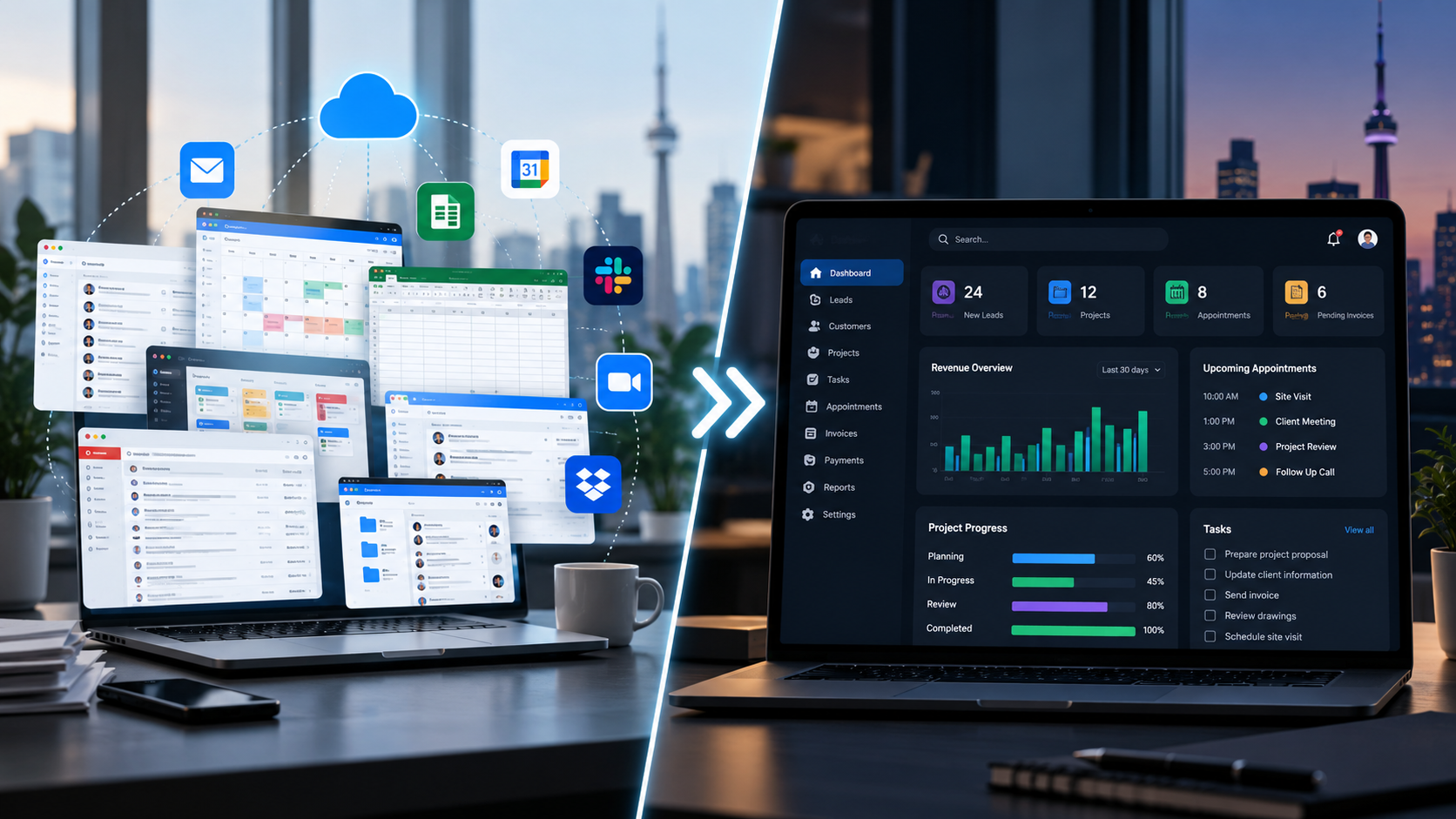
Web Development9/28/2026
Custom Web Applications vs Generic SaaS Platforms
Custom web applications and SaaS platforms solve different business needs. Learn the key differences in flexibility, integrations, cost, control, and scalability.
Custom Web Applications vs SaaS Platforms: Which Fits Your Business?
Businesses today have more software choices than ever.
A company can subscribe to a ready-made SaaS platform, combine several software tools, or invest in a custom web application built around its own workflow.
Each approach has advantages and limitations.
The right choice depends on what your business needs the software to accomplish, how complex your processes are, how quickly you need to get started, and how much flexibility you need over time.
This guide explains the key differences between custom web applications and SaaS platforms so you can make a more informed decision.
What Is a SaaS Platform?
SaaS stands for Software as a Service.
Instead of building and hosting software yourself, you subscribe to a platform provided by another company.
Common examples include software for:
- Customer relationship management
- Accounting
- Project management
- Appointment scheduling
- Email marketing
- Team communication
- Inventory management
- File management
- Accounting
- Project management
- Appointment scheduling
- Email marketing
- Team communication
- Inventory management
- File management
The software provider manages the underlying platform, infrastructure, updates, and many technical responsibilities.
For many businesses, SaaS is a practical way to start using software without building a system from scratch.
What Is a Custom Web Application?
A custom web application is software designed around the specific requirements of a business.
Instead of adapting your workflow to an existing product, the application is developed around the processes, information, users, and integrations that your business actually needs.
A custom web application might include:
- Customer management
- Lead management
- Project management
- Task management
- Appointment scheduling
- Customer portals
- Invoicing
- Payments
- Inventory
- Reporting
- Dashboards
- Document management
- Business automation
- Third-party integrations
- Lead management
- Project management
- Task management
- Appointment scheduling
- Customer portals
- Invoicing
- Payments
- Inventory
- Reporting
- Dashboards
- Document management
- Business automation
- Third-party integrations
The exact features depend on the business.
For a deeper explanation of custom web applications, see our practical guide to custom web application development in Canada.
Custom Web Application vs SaaS: The Main Differences
The biggest differences usually involve flexibility, setup, cost structure, integrations, control, and maintenance.
1. Flexibility
SaaS platforms are designed to serve many businesses.
That means they usually provide a predefined set of features and configuration options.
You may be able to customize settings, fields, workflows, or reports, but you are generally working within the capabilities of the platform.
A custom web application can be designed around your specific workflow.
For example, if your business has a process that does not fit a standard CRM or project management platform, a custom application can be built around that process.
This can be useful when your workflow is an important part of how your business operates.
2. Setup and Time to Launch
SaaS platforms can often be started relatively quickly.
A business may be able to create an account, configure settings, import information, and begin using the software without a development project.
Custom development usually requires more planning.
A typical process can include:
Discovery → Requirements → Design → Development → Testing → Deployment → Maintenance
This means a custom application generally requires more time before the complete system is ready.
The benefit is that the resulting application can be designed specifically around the requirements identified during the process.
3. Cost Structure
The cost structure is different between the two approaches.
With SaaS, businesses commonly pay a recurring subscription.
Depending on the platform, pricing may depend on:
- Number of users
- Features
- Storage
- Usage
- Integrations
- Support level
- Subscription tier
- Features
- Storage
- Usage
- Integrations
- Support level
- Subscription tier
With custom development, there is usually a development cost to create the application, followed by ongoing costs such as hosting, maintenance, security updates, support, and future improvements.
Neither approach has a universally lower total cost.
A business should consider the complete cost over the period it expects to use the system rather than looking only at the initial price.
4. Integrations
Integrations can become important when a business uses several different systems.
A SaaS platform may provide integrations through built-in connections, plugins, or APIs.
This can work well when the required integration is already supported.
However, a business may eventually encounter a situation where:
- The required integration is not available
- The integration has limited functionality
- Important data cannot be synchronized
- Additional software is required
- The workflow still requires manual steps
- The integration has limited functionality
- Important data cannot be synchronized
- Additional software is required
- The workflow still requires manual steps
A custom web application can be designed with specific integrations in mind.
For example, a business system could connect with selected payment services, accounting software, calendars, e-commerce platforms, email services, or other internal systems.
The exact possibilities depend on the systems involved and the available APIs.
5. Workflow Fit
This is one of the most important differences.
A SaaS platform is built around a general business model.
Your business may have to adjust some processes to fit the software.
That is not necessarily a problem.
If the SaaS workflow already matches your business, using it may be the simplest option.
The situation changes when employees constantly create workarounds because the software does not match the way the business operates.
For example:
Customer enquiry → Spreadsheet → Email → Appointment → Separate project system → Invoice
A custom system could potentially connect those stages:
Lead → Customer → Appointment → Project → Task → Invoice → Payment
The objective is not to build custom software simply because it is possible.
The objective is to create a system when the business problem justifies it.
6. Control and Customization
With SaaS, the software provider controls the core product.
The provider decides:
- Which features are added
- Which features are changed
- Which integrations are supported
- How the interface evolves
- How pricing and plans are structured
- Which features are changed
- Which integrations are supported
- How the interface evolves
- How pricing and plans are structured
Businesses can usually configure the platform within the options provided.
With a custom application, the business has much more control over the application's functionality and development roadmap.
However, that control also comes with responsibility.
Someone needs to manage development, hosting, maintenance, security, backups, updates, and future changes.
7. Scalability
Both SaaS and custom applications can support growing businesses, but they scale differently.
A SaaS platform may make it easy to add users or move to a higher plan.
However, growing businesses may eventually encounter limitations related to:
- User limits
- Feature tiers
- Usage limits
- Data volume
- Workflow customization
- Integration requirements
- Feature tiers
- Usage limits
- Data volume
- Workflow customization
- Integration requirements
A custom application can be designed with the expected business requirements in mind.
New modules, workflows, reports, or integrations can be added as the business evolves.
That does not mean custom software automatically scales better. The architecture, hosting environment, development quality, and maintenance strategy all matter.
8. Maintenance and Responsibility
One of the advantages of SaaS is that the provider manages much of the technical infrastructure.
The business does not normally need to maintain the underlying application itself.
With custom software, ongoing maintenance becomes part of the ownership model.
This can include:
- Security updates
- Bug fixes
- Server and hosting management
- Backups
- Performance monitoring
- Dependency updates
- Feature improvements
- Integration maintenance
- Bug fixes
- Server and hosting management
- Backups
- Performance monitoring
- Dependency updates
- Feature improvements
- Integration maintenance
For a business considering custom development, these ongoing responsibilities should be included in the planning from the beginning.
When SaaS May Be the Better Fit
A SaaS platform may make sense when:
- Your business has standard requirements
- You need software quickly
- An existing platform already solves the problem
- You do not need extensive customization
- You prefer predictable recurring software costs
- You do not want to manage application development
- Your required integrations are already supported
- You need software quickly
- An existing platform already solves the problem
- You do not need extensive customization
- You prefer predictable recurring software costs
- You do not want to manage application development
- Your required integrations are already supported
For many businesses, there is no reason to build custom software when an existing platform already does the job well.
When a Custom Web Application May Make More Sense
Custom development may be worth exploring when:
- Your workflow is significantly different from standard software
- Employees rely on multiple spreadsheets and manual processes
- Several systems need to work together
- You need a specialized customer or employee portal
- Existing software requires too many workarounds
- You need a workflow built around your specific business process
- Your application needs to connect several internal systems
- You need functionality that existing platforms do not provide
- Employees rely on multiple spreadsheets and manual processes
- Several systems need to work together
- You need a specialized customer or employee portal
- Existing software requires too many workarounds
- You need a workflow built around your specific business process
- Your application needs to connect several internal systems
- You need functionality that existing platforms do not provide
If you are experiencing several of these problems, our guide on 5 Clear Signs Your Business Needs a Custom Web App can help you evaluate whether custom development is worth considering.
The Hybrid Approach
The decision does not always have to be custom software versus SaaS.
Many businesses can use both.
For example, a company might use:
- SaaS accounting software
- SaaS email and communication tools
- A SaaS payment service
- A custom customer management system
- A custom operations dashboard
- A custom booking workflow
- SaaS email and communication tools
- A SaaS payment service
- A custom customer management system
- A custom operations dashboard
- A custom booking workflow
This approach can make sense when standard software handles common business functions well, while custom software is reserved for processes that require more specialized functionality.
The goal is to use the right tool for each part of the business.
A Simple Build-or-Buy Framework
Before choosing between SaaS and custom development, ask these questions:
Question 1: Does an existing platform already solve the problem?
If yes, compare its features, limitations, pricing, and long-term suitability.
Question 2: How unique is your workflow?
If your process is similar to thousands of other businesses, a SaaS platform may already be a good fit.
If your process is highly specific, custom development may deserve more consideration.
Question 3: How many systems are involved?
If employees constantly move information between different applications, connecting those workflows may provide significant operational value.
Question 4: How important is customization?
If you only need a few standard features, custom development may be unnecessary.
If the software is central to your daily operations, deeper customization may become more valuable.
Question 5: What are the long-term costs?
Consider:
- Subscription fees
- User-based pricing
- Add-ons
- Integration costs
- Development costs
- Hosting
- Maintenance
- Support
- Future changes
- User-based pricing
- Add-ons
- Integration costs
- Development costs
- Hosting
- Maintenance
- Support
- Future changes
Looking at the full cost over several years can provide a clearer picture than comparing only the initial price.
A Practical Example
Imagine a service company managing leads, customers, projects, appointments, and invoices.
The company currently uses:
CRM + Spreadsheet + Calendar + Email + Invoicing Software
Each tool works, but employees regularly move information between them.
A custom business system could connect the workflow:
Lead → Customer → Appointment → Project → Task → Invoice → Payment → Dashboard
The company could still keep external SaaS tools where they make sense while using the custom system as the central operational workflow.
This is one example of how a hybrid technology approach can work.
Custom Does Not Automatically Mean Better
It is important to avoid treating custom development as the answer to every software problem.
Custom software introduces its own responsibilities.
A poorly planned application can become expensive to maintain. Requirements can change during development. Integrations can require additional work. Future updates need to be managed.
For this reason, the first step should always be understanding the business problem.
The question should be:
What does the business need the software to accomplish?
Not:
Can we build custom software?
That distinction can help businesses make better technology decisions.
Final Thoughts
SaaS platforms and custom web applications serve different purposes.
SaaS can be a practical choice when a business needs a standard solution quickly and the available functionality fits its workflow.
Custom web applications can be useful when a business has specialized processes, complex workflows, multiple systems, or requirements that standard software cannot handle effectively.
A hybrid approach can also combine the strengths of both.
The best starting point is to understand your current workflow, identify the problems that need to be solved, and compare the available options before committing to a technology approach.
Lutfur Digital Studio builds custom web applications, business management systems, dashboards, booking systems, customer portals, and workflow-based platforms for businesses across Canada.
Ready to Explore Your Options?
If you are unsure whether your business needs a SaaS platform, a custom web application, or a combination of both, start by reviewing your current workflow and identifying where your existing tools are creating limitations.