Back to blog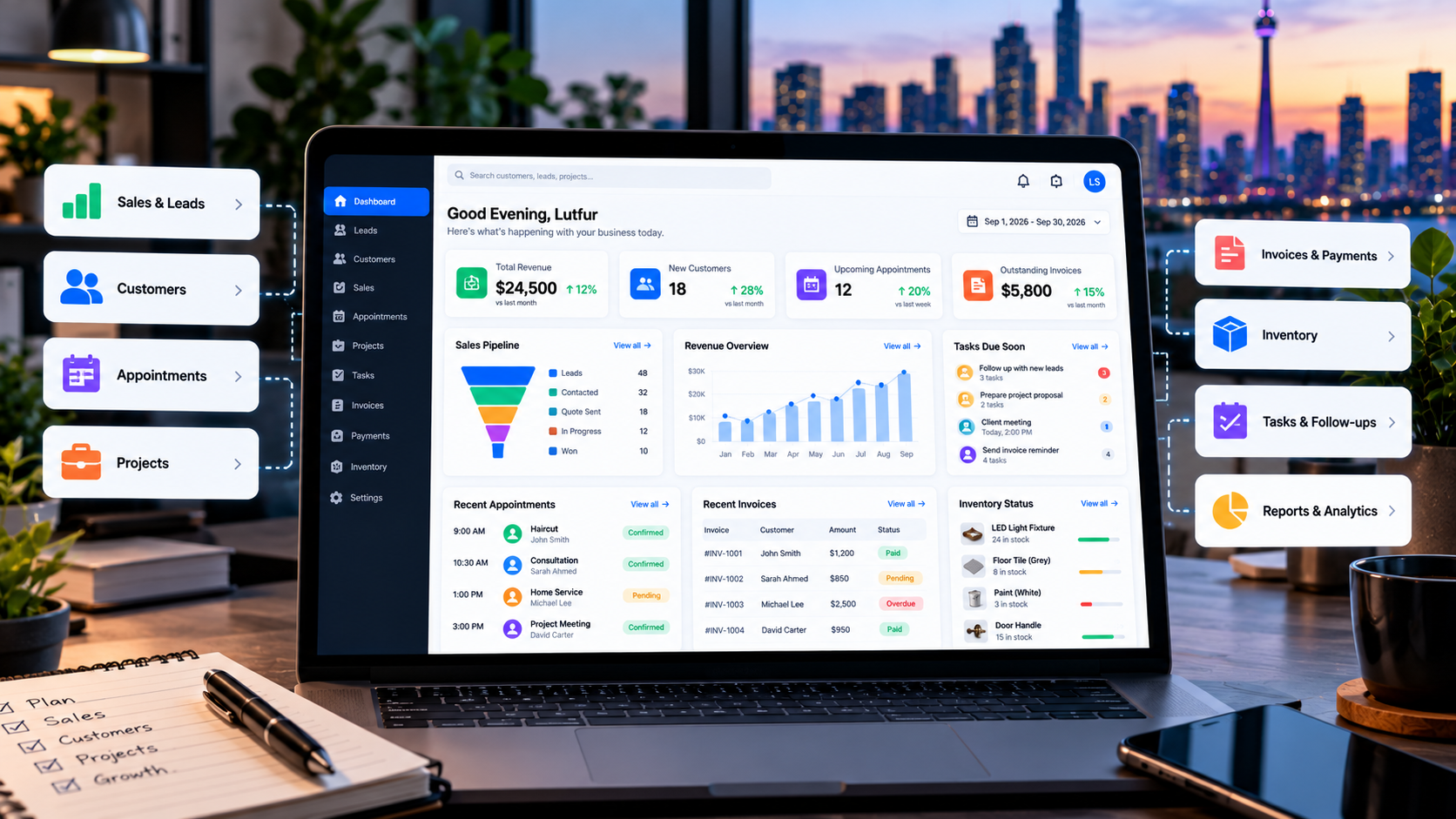
Business Systems9/28/2026
What Should a Business Management Dashboard Include?
A business management dashboard should make important information easy to understand and act on. Learn which features, KPIs, workflows, and reports a small business dashboard should include.
What Should a Business Management Dashboard Include?
Running a growing business often means dealing with information from many different places.
Sales may be tracked in one system.
Customer information may be somewhere else.
Appointments may be managed through a calendar.
Invoices may be handled separately.
Tasks may live in spreadsheets or project management software.
And important numbers may only become clear when someone manually creates a report.
A business management dashboard can bring important information into one place.
Instead of checking several systems to understand what is happening, a business owner or manager can use a dashboard to see key information, identify problems, and decide what needs attention.
But a useful dashboard is not simply a screen filled with charts.
It should answer practical business questions.
What is happening?
What needs attention?
What changed?
What should we do next?
This guide explains what a business management dashboard should include and when a custom dashboard may make sense.
What Is a Business Management Dashboard?
A business management dashboard is a central interface that displays important business information in a structured and easy-to-understand format.
Depending on the business, a dashboard can bring together information such as:
- Sales
- Revenue
- Customers
- Leads
- Appointments
- Projects
- Tasks
- Invoices
- Payments
- Inventory
- Staff activity
- Business performance
- Reports and analytics
- Revenue
- Customers
- Leads
- Appointments
- Projects
- Tasks
- Invoices
- Payments
- Inventory
- Staff activity
- Business performance
- Reports and analytics
The exact information should depend on the business.
A restaurant does not need the same dashboard as a contractor.
A salon does not need the same dashboard as an e-commerce company.
The goal is to show the information that helps the business operate and make decisions.
1. Start With the Most Important KPIs
The first section of a dashboard should usually focus on the numbers that matter most.
These are often called Key Performance Indicators, or KPIs.
Depending on the business, KPIs might include:
- Revenue
- Sales
- Number of new customers
- Open leads
- Outstanding invoices
- Completed projects
- Upcoming appointments
- Inventory value
- Expenses
- Profit-related metrics
- Sales
- Number of new customers
- Open leads
- Outstanding invoices
- Completed projects
- Upcoming appointments
- Inventory value
- Expenses
- Profit-related metrics
A dashboard does not need dozens of KPIs.
Too many numbers can make the dashboard harder to understand.
Instead, focus on the information that management actually needs to review regularly.
For example, a service business might start with:
Revenue | Open Leads | Upcoming Appointments | Outstanding Invoices
An e-commerce business might need:
Sales | Orders | Average Order Value | Inventory Alerts
A contractor might need:
Open Projects | Quotes | Upcoming Jobs | Outstanding Payments
The dashboard should reflect the business model.
2. Sales and Lead Information
For businesses that generate leads, the dashboard can provide a quick view of the sales pipeline.
Useful information may include:
- New leads
- Contacted leads
- Qualified leads
- Quotes sent
- Deals in progress
- Won deals
- Lost deals
- Expected sales value
- Follow-up tasks
- Contacted leads
- Qualified leads
- Quotes sent
- Deals in progress
- Won deals
- Lost deals
- Expected sales value
- Follow-up tasks
A sales dashboard can help answer questions such as:
How many new leads came in this week?
Which leads still need follow-up?
How much potential business is currently in the pipeline?
Which opportunities were recently won or lost?
This becomes especially useful when the business receives leads from multiple sources.
3. Customer Information
Customer information is another important part of many business dashboards.
A dashboard may show:
- Total customers
- New customers
- Active customers
- Recent customers
- Customer history
- Last interaction
- Upcoming appointments
- Outstanding balances
- New customers
- Active customers
- Recent customers
- Customer history
- Last interaction
- Upcoming appointments
- Outstanding balances
For businesses with repeat customers, customer history can be particularly valuable.
Instead of looking at a customer record in one system and an appointment in another, the dashboard can bring relevant information together.
For example:
Customer → Previous appointments → Current project → Invoice → Payment status
This creates a more connected view of the customer relationship.
4. Appointments and Scheduling
Businesses that rely on appointments should be able to see upcoming bookings quickly.
An appointment section may include:
- Today's appointments
- Upcoming appointments
- Pending appointments
- Cancelled appointments
- Staff assignments
- Appointment status
- Customer information
- Upcoming appointments
- Pending appointments
- Cancelled appointments
- Staff assignments
- Appointment status
- Customer information
A calendar view can also be useful for businesses with multiple employees or services.
For example, a service company may want to see:
Customer → Service → Date → Time → Assigned staff member → Status
This makes the dashboard more than a reporting tool.
It becomes part of the daily workflow.
5. Tasks and Follow-Ups
A dashboard should also show work that requires attention.
This could include:
- Tasks due today
- Overdue tasks
- Upcoming tasks
- Customer follow-ups
- Project tasks
- Internal reminders
- Overdue tasks
- Upcoming tasks
- Customer follow-ups
- Project tasks
- Internal reminders
For a sales team, this might mean follow-up calls.
For a contractor, it might mean preparing an estimate.
For a service business, it might mean contacting a customer before an appointment.
A useful dashboard should help people move from information to action.
6. Projects and Operations
Businesses that manage projects can use a dashboard to track their operational workload.
Useful information may include:
- Active projects
- Project status
- Upcoming deadlines
- Assigned team members
- Tasks completed
- Tasks remaining
- Delayed work
- Project value
- Project status
- Upcoming deadlines
- Assigned team members
- Tasks completed
- Tasks remaining
- Delayed work
- Project value
For example:
Project → Customer → Status → Tasks → Deadline → Team → Financial status
This can give an owner or manager a quick understanding of what is happening across active projects.
7. Invoices and Payments
Financial information is another common dashboard requirement.
A business management dashboard may show:
- Unpaid invoices
- Overdue invoices
- Paid invoices
- Total invoiced
- Payments received
- Outstanding balances
- Recent transactions
- Overdue invoices
- Paid invoices
- Total invoiced
- Payments received
- Outstanding balances
- Recent transactions
This does not necessarily replace accounting software.
Instead, the dashboard can provide an operational view of important financial information.
For example, a business owner may want to see:
$24,500 invoiced | $18,700 paid | $5,800 outstanding
The numbers should link back to the underlying records where possible.
8. Inventory and Stock Information
Inventory becomes important for businesses that sell products or maintain physical stock.
A dashboard may include:
- Current inventory
- Low-stock items
- Out-of-stock products
- Inventory value
- Recent stock movements
- Purchase orders
- Supplier information
- Low-stock items
- Out-of-stock products
- Inventory value
- Recent stock movements
- Purchase orders
- Supplier information
An e-commerce or retail business may also want to connect inventory information with sales.
For example:
Product → Stock level → Recent sales → Pending orders → Reorder requirement
This can make inventory information much more useful than a simple stock list.
9. Reports and Analytics
A dashboard can provide both real-time information and historical analysis.
Useful reports may include:
- Sales by period
- Revenue trends
- Customer growth
- Lead conversion
- Appointment volume
- Project performance
- Payment trends
- Inventory movement
- Revenue trends
- Customer growth
- Lead conversion
- Appointment volume
- Project performance
- Payment trends
- Inventory movement
Charts can make trends easier to understand.
For example, a revenue chart can show whether sales are increasing, decreasing, or remaining relatively stable.
But charts should exist for a reason.
A dashboard should not include a chart simply because the software can create one.
The question should be:
What decision does this information help us make?
10. Alerts and Exceptions
One of the most useful dashboard features can be highlighting things that need attention.
Examples include:
- Overdue invoices
- Low inventory
- Overdue tasks
- Uncontacted leads
- Missed appointments
- Delayed projects
- Failed payments
- Low inventory
- Overdue tasks
- Uncontacted leads
- Missed appointments
- Delayed projects
- Failed payments
Instead of forcing a manager to search through every record, the dashboard can bring exceptions to the surface.
For example:
3 overdue invoices
5 leads waiting for follow-up
2 projects past their expected deadline
This can turn the dashboard into an operational control centre.
11. Role-Based Dashboards
Not everyone in a business needs to see the same information.
An owner may want:
- Revenue
- Sales
- Profit-related information
- Outstanding payments
- Business performance
- Sales
- Profit-related information
- Outstanding payments
- Business performance
A sales employee may need:
- Leads
- Follow-ups
- Deals
- Customers
- Follow-ups
- Deals
- Customers
A project manager may need:
- Active projects
- Tasks
- Deadlines
- Team assignments
- Tasks
- Deadlines
- Team assignments
An administrator may need:
- Appointments
- Customers
- Payments
- System activity
- Customers
- Payments
- System activity
Role-based dashboards can keep the interface focused on the information relevant to each user.
12. Search and Filters
As the amount of business data grows, search and filtering become important.
Users may want to filter information by:
- Date
- Customer
- Staff member
- Project
- Service
- Status
- Location
- Product
- Customer
- Staff member
- Project
- Service
- Status
- Location
- Product
For example, a manager might want to see:
All unpaid invoices from the last 30 days
or:
All active projects assigned to one employee
or:
All appointments scheduled for tomorrow
Good filtering can make a large amount of information much easier to work with.
13. Mobile Access
Business owners and managers are not always sitting at a desktop computer.
A dashboard may need to work well on:
- Phones
- Tablets
- Laptops
- Desktop computers
- Tablets
- Laptops
- Desktop computers
Mobile access can be particularly useful for businesses where managers spend time outside the office.
The mobile version does not necessarily need to display every piece of information.
It should prioritize the actions and information that users need while away from a desktop.
14. Notifications
Some information should not require users to constantly check the dashboard.
Depending on the workflow, notifications may be useful for:
- New leads
- New bookings
- New orders
- Payment received
- Failed payment
- Low inventory
- Overdue task
- Customer message
- New bookings
- New orders
- Payment received
- Failed payment
- Low inventory
- Overdue task
- Customer message
Notifications can be delivered through supported channels such as email, SMS, or in-app alerts.
The important part is making notifications useful rather than overwhelming.
15. Integrations
A dashboard becomes more powerful when it can work with the systems a business already uses.
Depending on the business, integrations may include:
- Payment providers
- Calendar systems
- CRM systems
- E-commerce platforms
- Accounting software
- Email systems
- Inventory systems
- Customer portals
- Business websites
- Calendar systems
- CRM systems
- E-commerce platforms
- Accounting software
- Email systems
- Inventory systems
- Customer portals
- Business websites
The purpose of an integration is to reduce unnecessary manual data entry and connect related workflows.
For example:
Website enquiry → Lead → Customer → Appointment → Invoice → Payment
Instead of entering the same information repeatedly, connected systems can pass relevant information between different stages.
16. Security and User Permissions
Business dashboards often contain sensitive business information.
A dashboard should therefore consider:
- User accounts
- Password security
- Role-based permissions
- Access control
- Session management
- Activity records
- Data protection
- Password security
- Role-based permissions
- Access control
- Session management
- Activity records
- Data protection
Different employees may need different levels of access.
For example, an employee may be able to manage appointments without being able to access financial reports.
The exact security architecture depends on the system and the type of data being handled.
17. Dashboard Performance Matters
A dashboard should not only look good.
It should also load information efficiently.
Large businesses can have thousands of customers, transactions, appointments, products, or project records.
If the dashboard tries to load everything at once, the experience can become slow.
Good dashboard development considers:
- Database queries
- Data loading
- Pagination
- Caching where appropriate
- API performance
- Efficient filtering
- Mobile performance
- Data loading
- Pagination
- Caching where appropriate
- API performance
- Efficient filtering
- Mobile performance
The goal is to make important information accessible without unnecessary waiting.
18. Should You Use Existing Software or Build a Custom Dashboard?
For many businesses, existing business software may already provide the required dashboard features.
A standard platform can make sense when:
- Your workflow is straightforward
- Your requirements are common
- Existing integrations are sufficient
- You want to start quickly
- You do not need unusual functionality
- Your requirements are common
- Existing integrations are sufficient
- You want to start quickly
- You do not need unusual functionality
A custom dashboard may make more sense when your business has a workflow that does not fit neatly into existing software.
For example:
Lead → Quote → Customer → Project → Task → Appointment → Invoice → Payment → Analytics
If your team has to move information manually between several systems, a custom business system may be able to connect these stages.
If you want to understand when custom software becomes useful, read our guide on 5 Clear Signs Your Business Needs a Custom Web App.
You can also read our guide to custom web application development in Canada.
What Should Be on the First Dashboard?
A common mistake is trying to build everything immediately.
A better approach is to start with the information users need most often.
For many small businesses, a first version might include:
Overview
- Revenue
- Open leads
- Upcoming appointments
- Outstanding invoices
- Open leads
- Upcoming appointments
- Outstanding invoices
Customers
- Customer list
- Customer details
- Recent activity
- Customer details
- Recent activity
Sales
- Leads
- Deals
- Follow-ups
- Deals
- Follow-ups
Operations
- Projects
- Tasks
- Appointments
- Tasks
- Appointments
Finance
- Invoices
- Payments
- Outstanding balances
- Payments
- Outstanding balances
Reports
- Revenue trends
- Sales performance
- Customer activity
- Sales performance
- Customer activity
Additional modules can be added as the business grows.
A Practical Business Dashboard Checklist
Before building or choosing a dashboard, ask:
1. What information does management check every day?
2. Which numbers are most important to the business?
3. Where is that information currently stored?
4. Are employees entering the same information into multiple systems?
5. Which tasks require manual reporting?
6. Which problems need immediate attention?
7. Who needs access to the dashboard?
8. What information should each role see?
9. Which systems need to be integrated?
10. Does the dashboard need mobile access?
11. What reports are actually used?
12. Which features are required now and which can wait?
2. Which numbers are most important to the business?
3. Where is that information currently stored?
4. Are employees entering the same information into multiple systems?
5. Which tasks require manual reporting?
6. Which problems need immediate attention?
7. Who needs access to the dashboard?
8. What information should each role see?
9. Which systems need to be integrated?
10. Does the dashboard need mobile access?
11. What reports are actually used?
12. Which features are required now and which can wait?
These questions can help define the scope before development begins.
Final Thoughts
A business management dashboard should make running a business easier, not create another complicated system to maintain.
The most useful dashboards bring important information together and make it easier to understand what is happening.
That may include:
Customers + Sales + Appointments + Projects + Tasks + Invoices + Payments + Inventory + Analytics
But every business does not need every module.
The right dashboard starts with the business workflow.
Identify the information that matters.
Connect the systems that need to work together.
Then build the dashboard around the decisions and actions your team makes every day.
Lutfur Digital Studio builds custom business dashboards and connected business systems for businesses across Canada. Dashboards can be designed around sales, customers, appointments, projects, payments, inventory, reporting, and other business workflows.
Ready to Bring Your Business Data Together?
If your team is managing important information across spreadsheets, calendars, emails, and disconnected software, a custom business dashboard may help bring the workflow into one place.